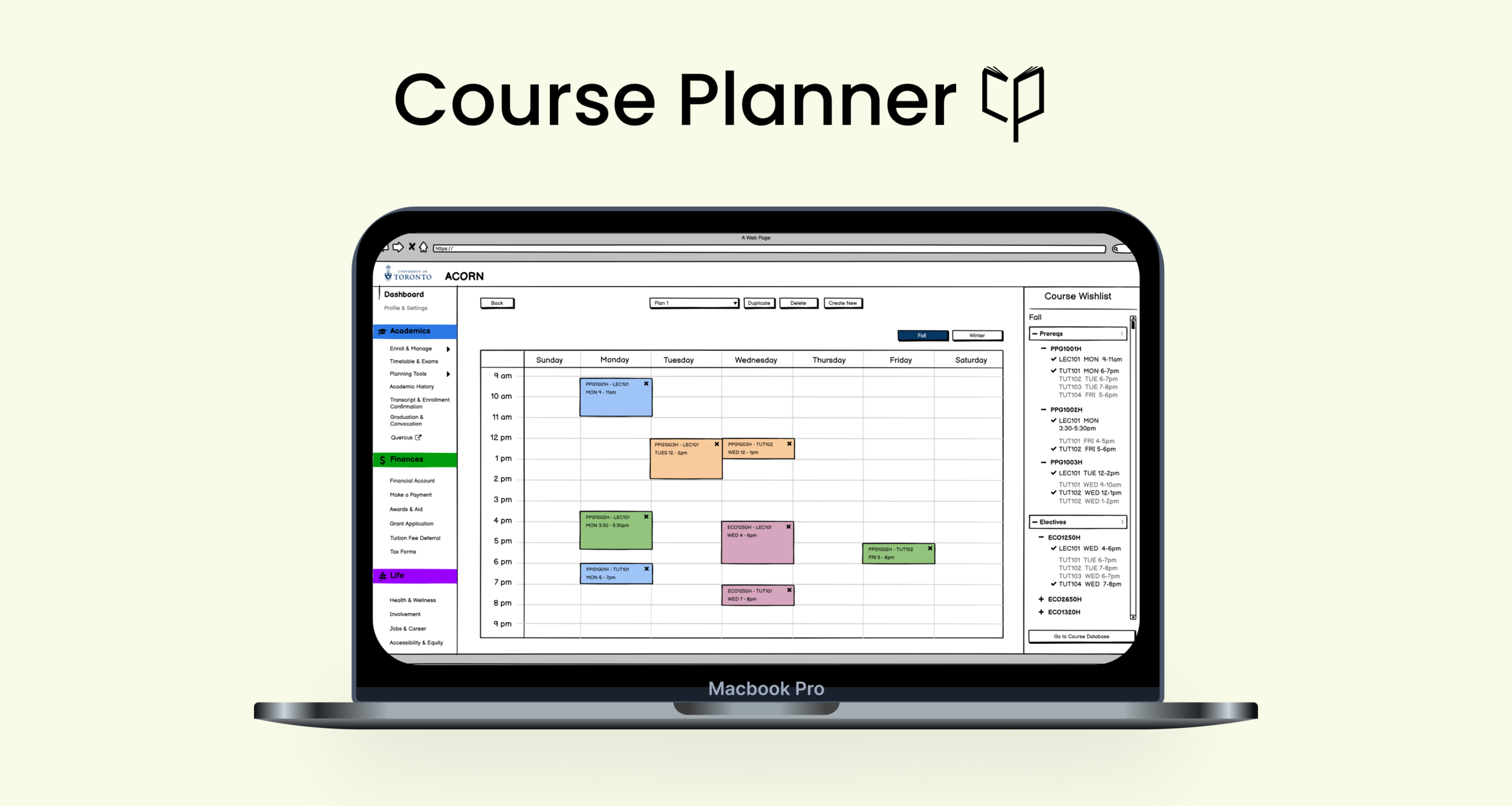
A web application that helps UofT students easily select their courses based on factors that matter to them with up to date information all in one spot.
PROJECT
Many graduate students spend on average 4 hours on course selections, expressing frustrations throughout the process. In collaboration with University of Toronto’s (UofT) Innovation Hub, using the IBM Activity Journey, I worked in a team of 6 where we wanted to 1) understand how the current course selection and enrollment experience is for graduate students and 2) how we can improve their experience. We created a digital solution, Course Planner, that would allow students to more easily navigate and complete their course selection process smoothly
In this project, I was responsible for conducting the user research (user interviews + surveys), analyzing and synthesizing the data, drafting the low and mid-fidelity mock-ups, and conducting usability tests.
INFO
My Contributions
User Research, Persona and Journey Flow Creation, Prototypes wireframes, and usability testing
Timeline
Sept-December 2021
Team
Sophie Archer, Vishal Monteiro, Yanan Huang, Hanshi Wang, & Yiran Dong
OVERVIEW
PROBLEM
Graduate students are currently struggling to navigate through the course selection and enrollment process in a timely manner, resulting in feelings of stress, frustration, and tiredness.
GOALS
to design a positive overall experience for graduate students when selecting their courses so that they find it fun, simple, and easy rather than dreading the process
to help graduate students meaningfully select courses that are of interest to them rather than rushing to get the process over with
SOLUTION-Course Planner
Course Planner is a one-stop shop for graduate students to find and favourite interested courses, compare courses against each other based on factors that matter to them, and build multiple timetables to check for course conflicts. Rather than having multiple tabs open, students now only need to access this one tool open to do all of their course selections at UofT, helping to reduce frustrations and anxieties students face during the process.
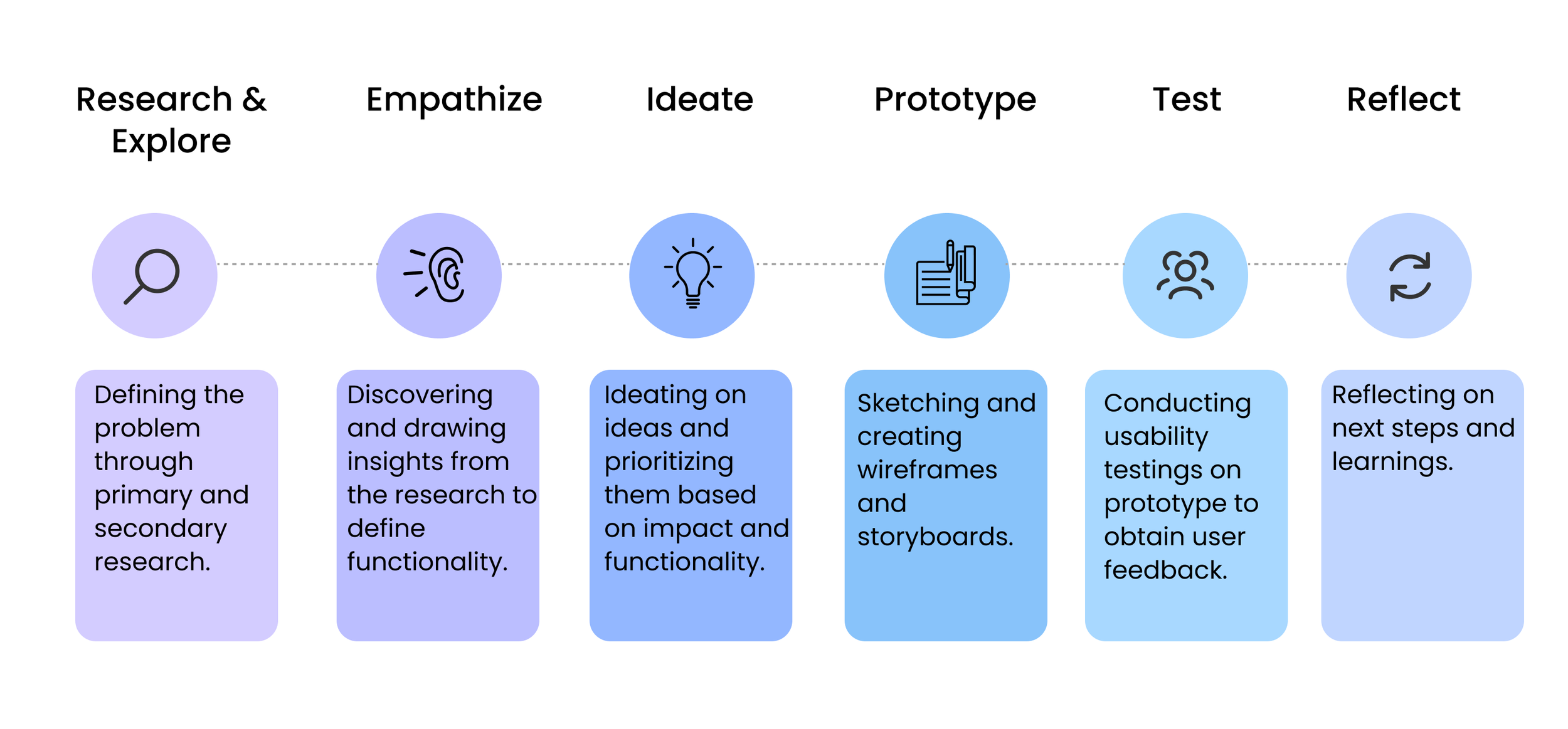
DESIGN THINKING PROCESS

RESEARCH & EXPLORE
Target User Group - Graduate Students
Secondary Research - We found that :
Graduate students did not have the same amount of support and guidance during the course selection process than undergraduate students did.
Graduate course information was organized differently for each faculty and campus —> no standard structure was seen even within departments, making the process of organizing, consolidating and analyzing information difficult.
On Reddit forums, while undergraduates sentiments towards the course selection process was heard consistently, less was also known about how graduate students felt.
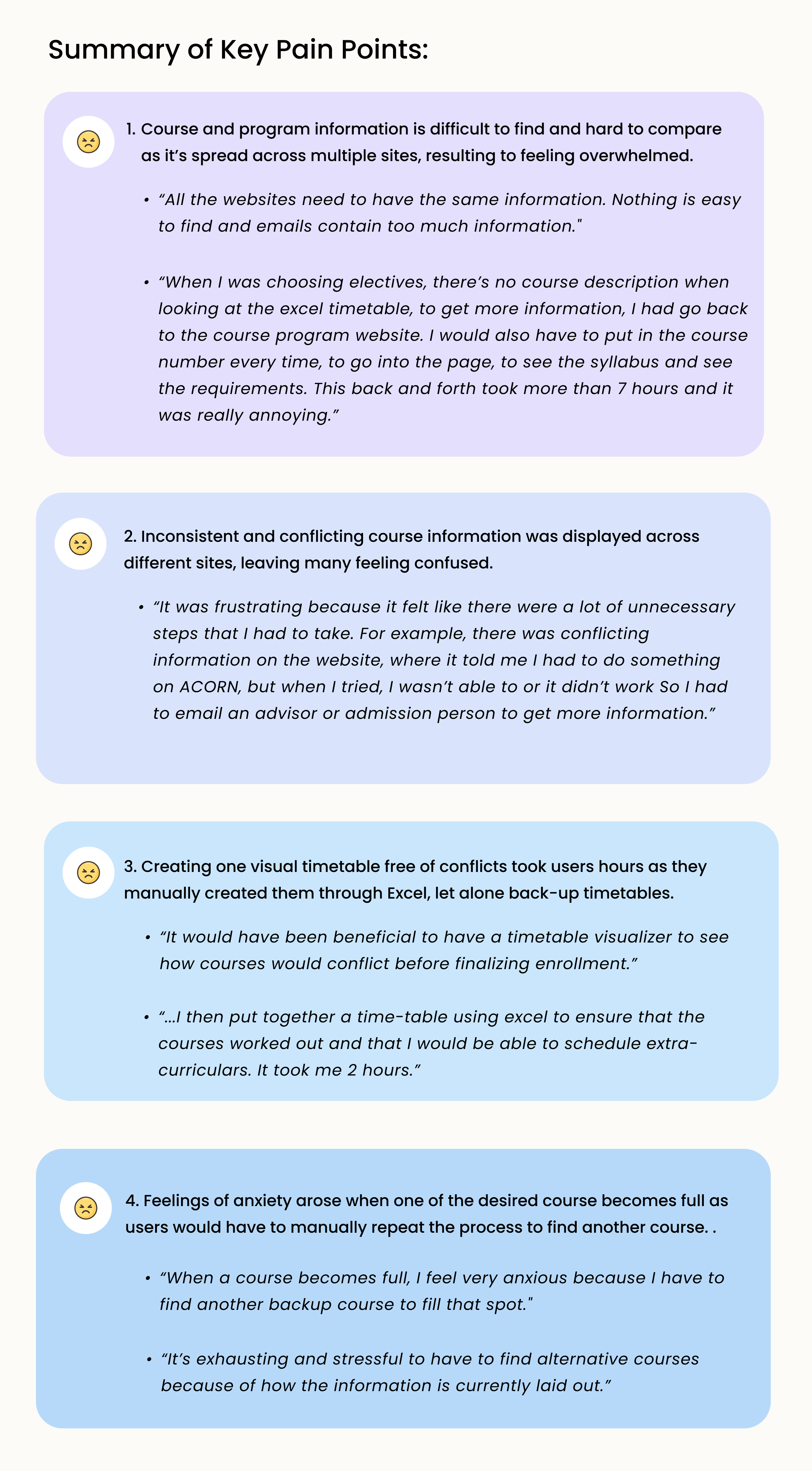
Primary Research - We found that:
Semi-structured user interviews with 11 graduate students and online surveys with 36 graduate students from English, Economics, Information, Public Policy, etc.
EMPATHIZE
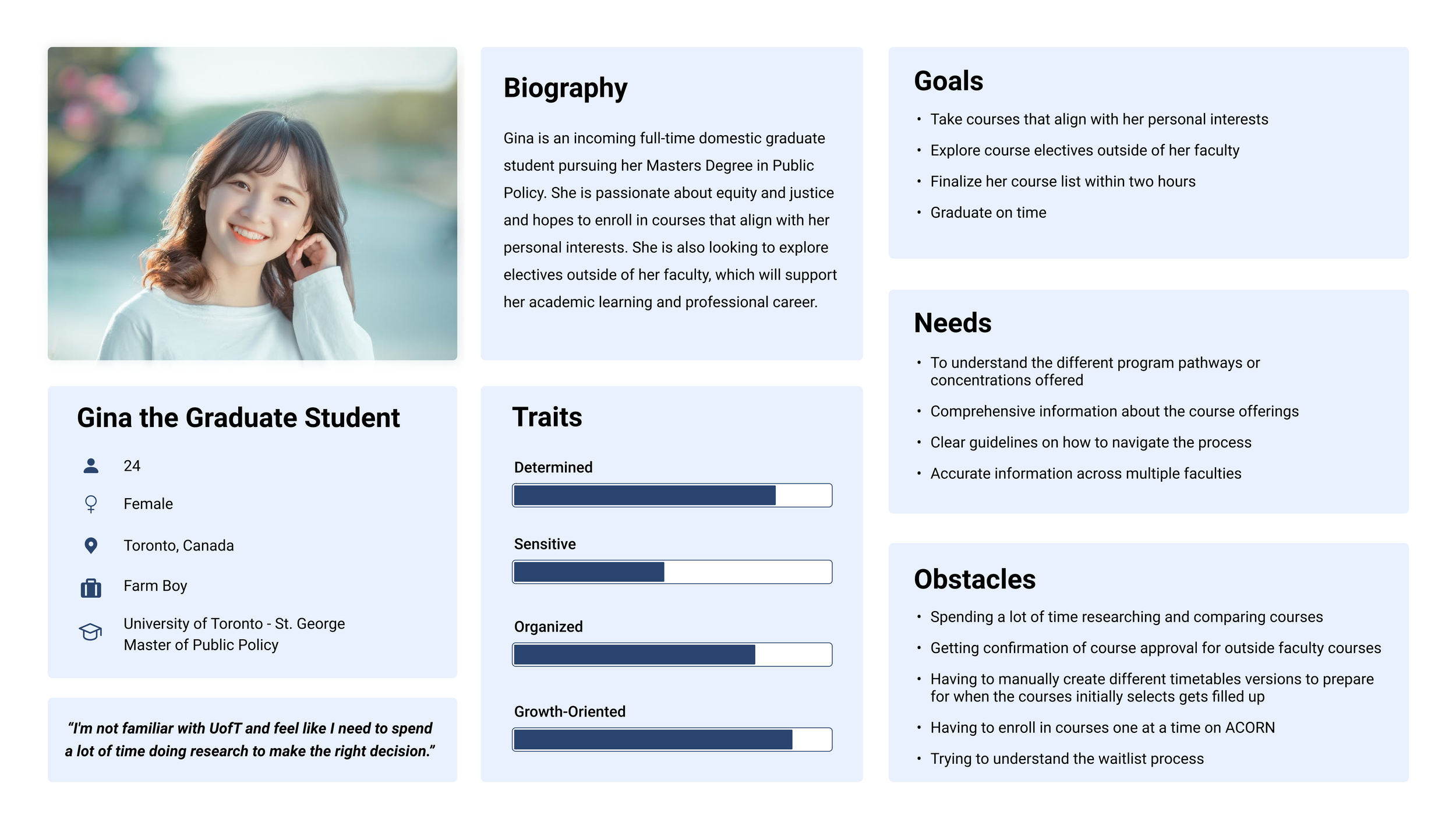
PERSONA
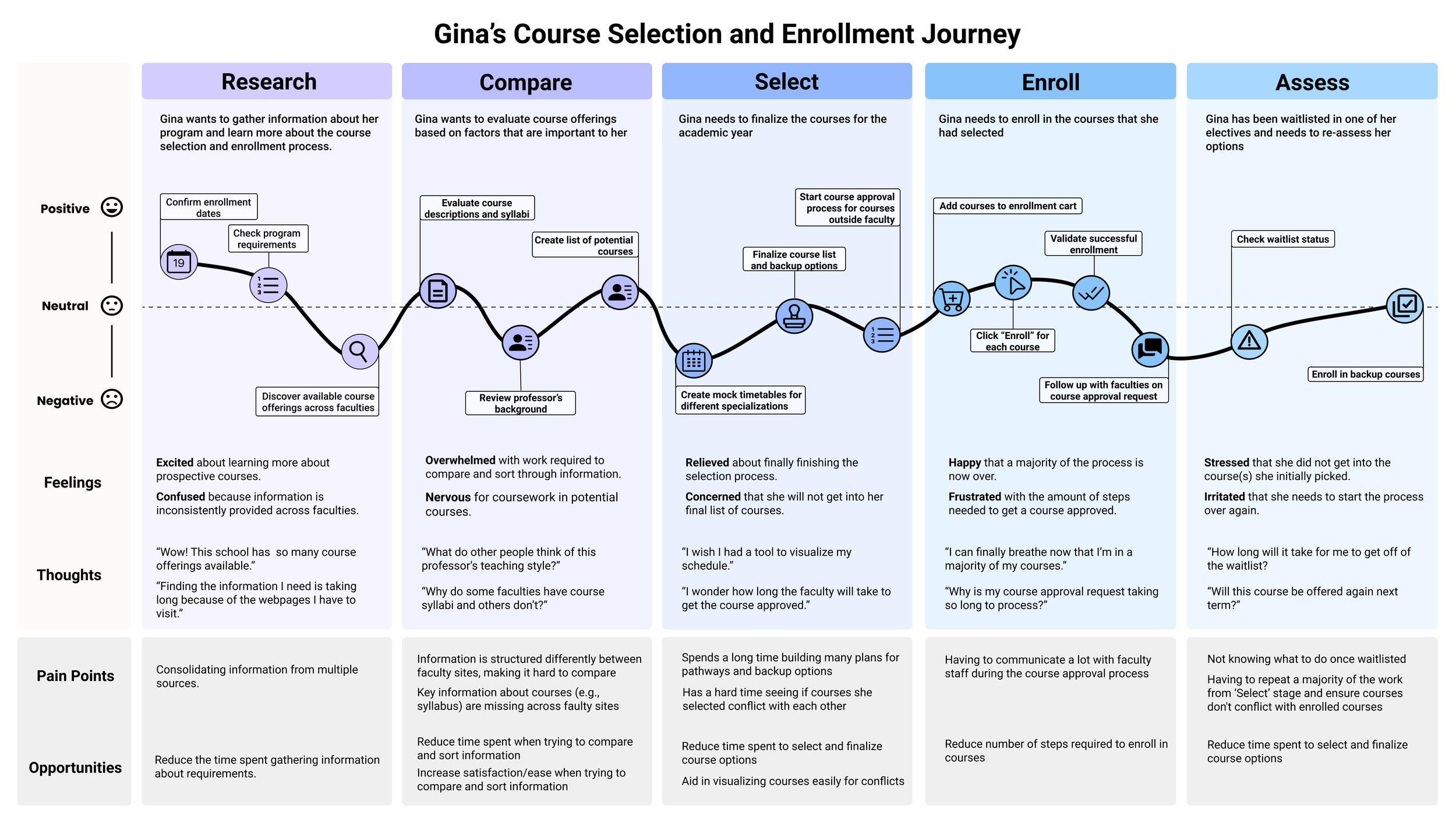
Gina the Graduate student was created to embody the different types of graduate students undergoing the course selection and enrollment process.
USER JOURNEY
We also crafted out how Gina’s course selection journey looks like to help us 1) identify the stages where she’s struggling the most and 2) empathize with her.
SO WHAT DOES GINA NEED?
In understanding Gina's current journey, we realized that what Gina needs is a way to:
Quickly find key information about her courses so that she can easily compare the course offerings and prepare for backup courses.
Easily consolidate information gathered from multiple sources so that she can make an informed decision for which courses to select.
Create multiple timetables easily so that she can have different backup plans ready and avoid course conflicts.

IDEATE
PRIORITIZATION GRID
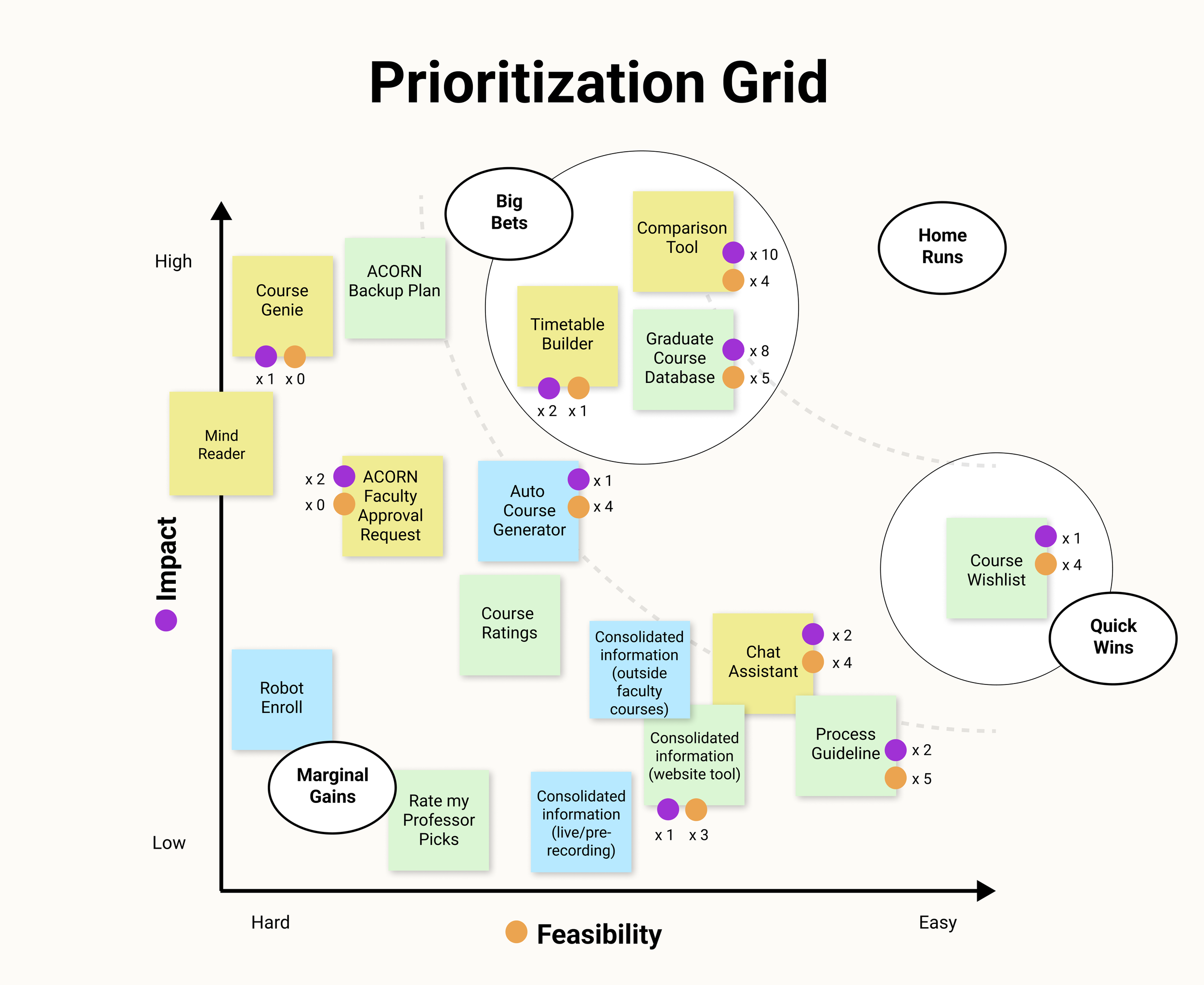
With Gina’s needs identified, we began mapping out some ideas to solve the problem. Each idea was evaluated by its perceived impact and feasibilities on the user’s experience.
We identified 4 ideas that could be combined together to create a robust solution: 1) course database, 2) course comparison, 3) course wishlist, and 4) timetable builder.
DESIGN GOALS
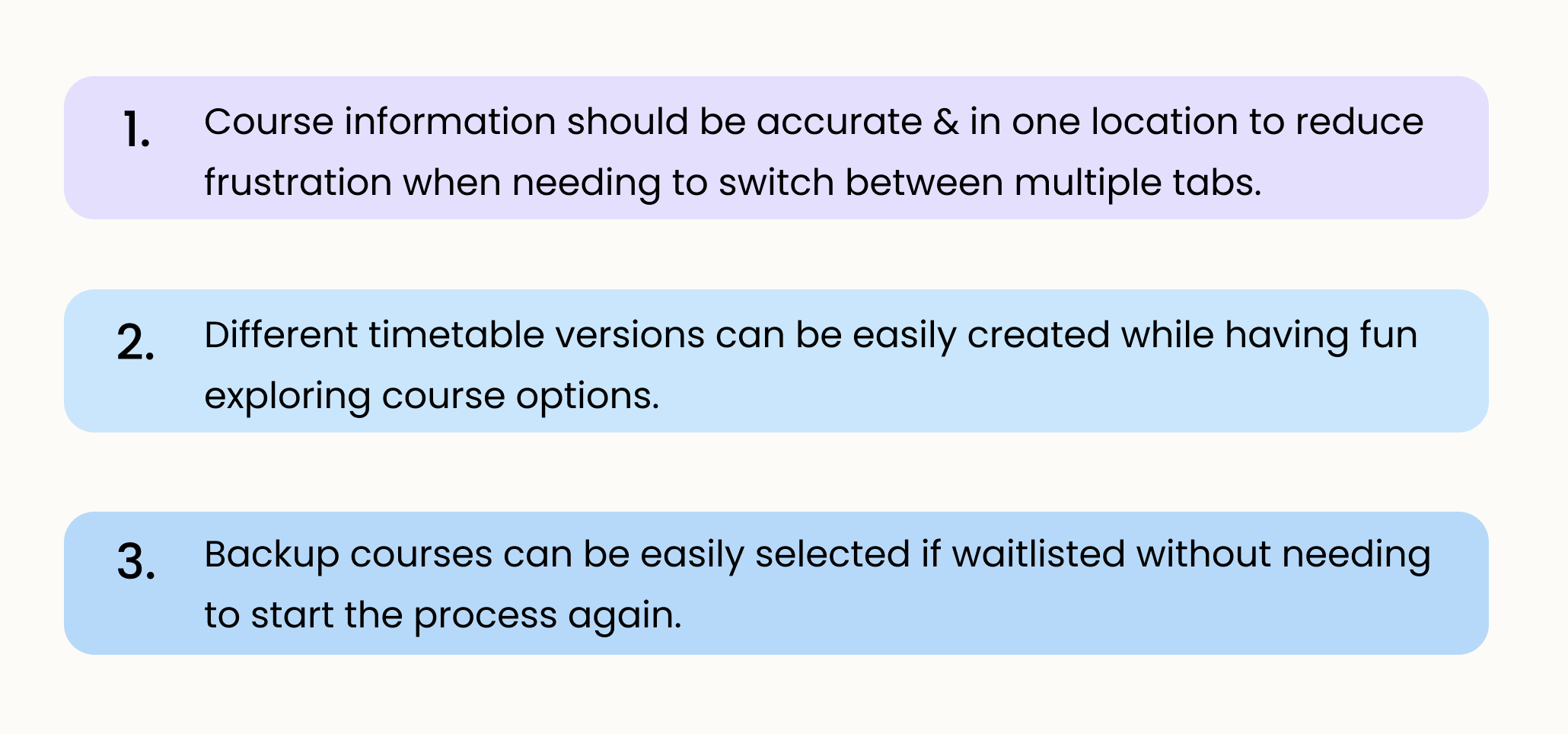
To help align us as a team and serve as guidelines when creating our prototype, we also developed a few design goals:
PROTOTYPE
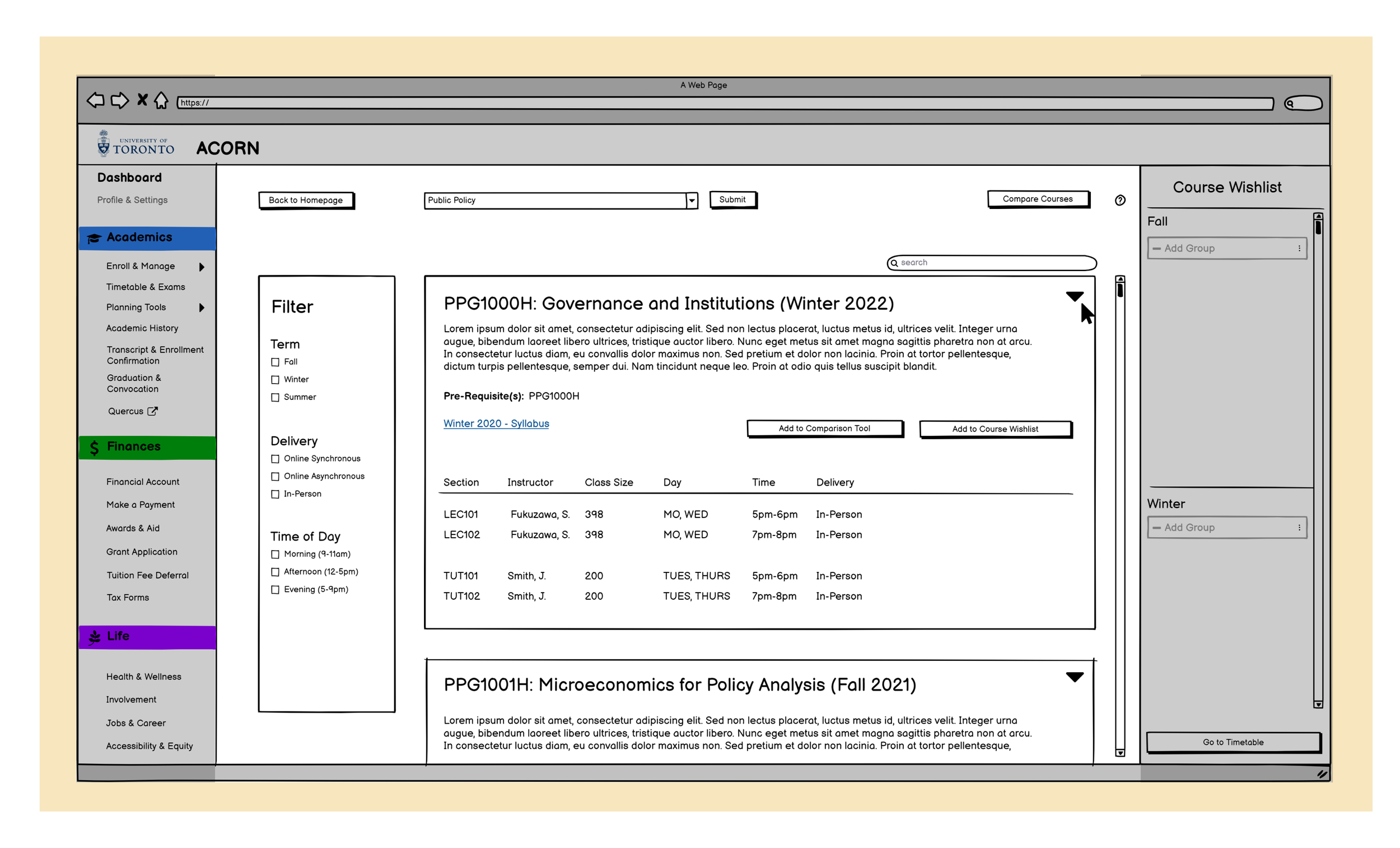
With these design goals in mind, we first created a lo-fi prototype (link) and conducted a guerilla usability test with 5 users which ultimately informed our decisions when creating the mid-fi prototype below. Please note that the Course Planner tool will be directly integrated into the UofT Student Portal, ACORN.
1. Course Database
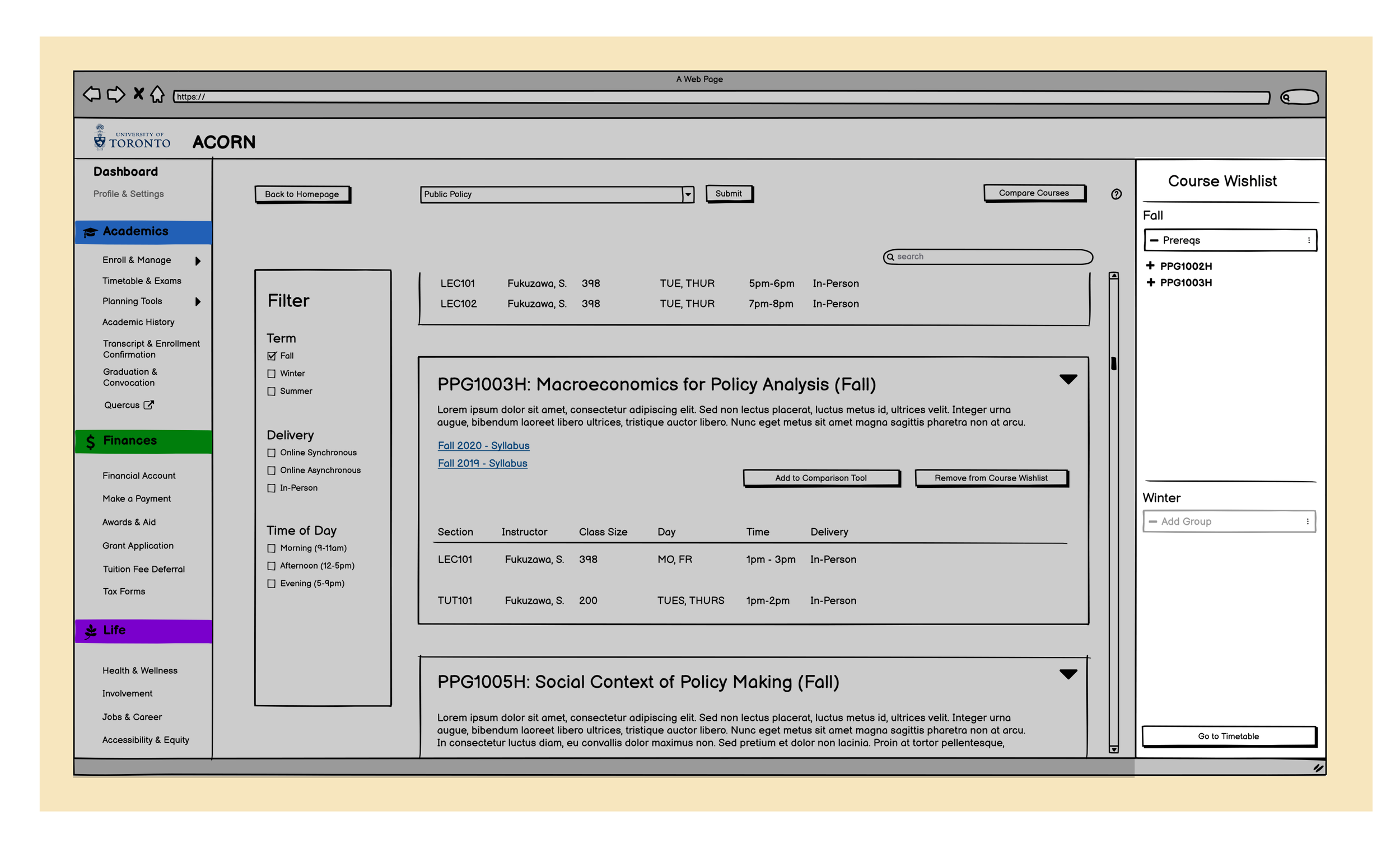
Users will find the course database under the sub-tab “Planning Tools” within “Academics.”
Upon entering the search parameter of, “Public Policy,” all relevant courses are displayed in a list (lower level to higher level courses) for easy parsing and exploration
To sort by term, lecture delivery method or by time of day, users can sort using the “Filter” on the left-hand
A search bar was also created to help with finding courses with particular key terms easily
2. Course Wishlist
To save interested courses for reference later and timetable creation, users can click on the “Add to Course Wishlist,” button under the course description.
Courses can be saved by terms (e.g., Fall term) or by personalized grouping based on the user’s discretion
3. Course Comparison
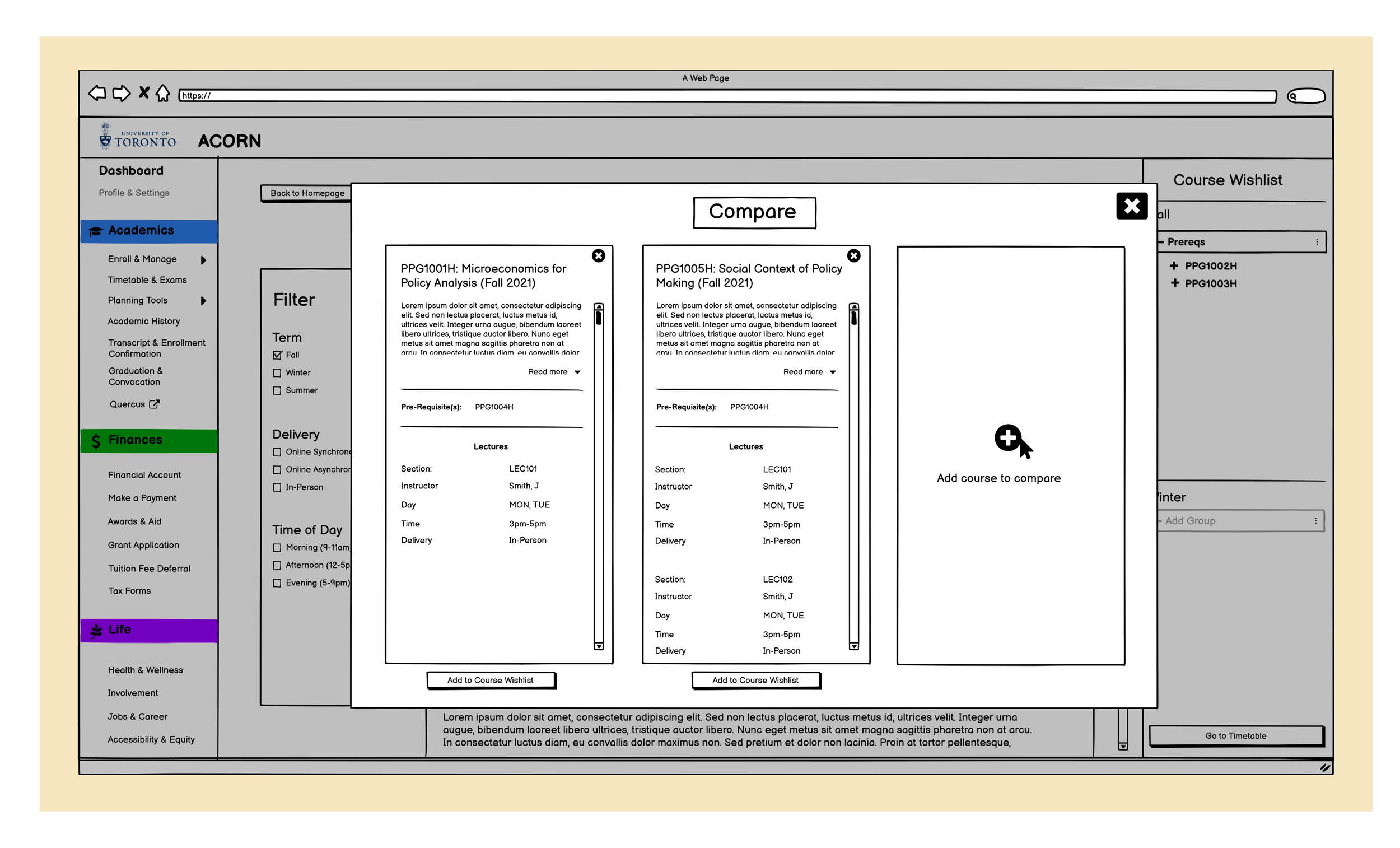
To compare a course with another course, users can click on the “Add to Comparison Tool,” button under the course description. Up to three courses can be added to this tool at a time.
Once at least two courses have been selected for comparison, a window will pop-up to display the course information
Courses can also be added directly from the pop-up, and removed once they aren’t needed anymore
Once comparisons are over, the pop-up can be closed and will lead the user directly back to the Graduate Course Database page
4. Timetable Builder
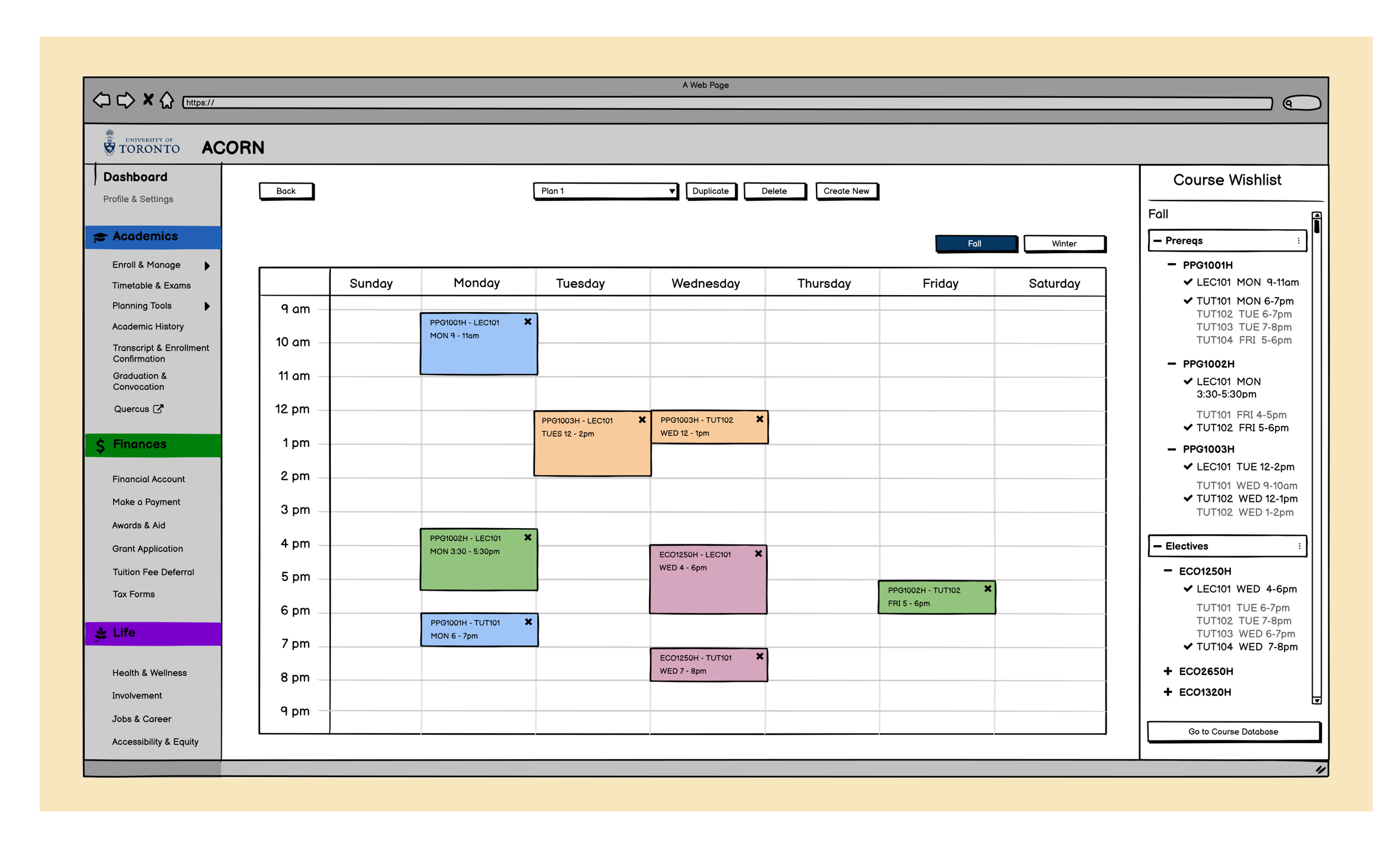
Timetables can be created by selecting the saved lectures and tutorials under the Course Wishlist
Default Fall and Winter blank timetable will be present
Multiple timetables can be built either from scratch or by duplicating existing ones

TEST
USABILITY TESTING
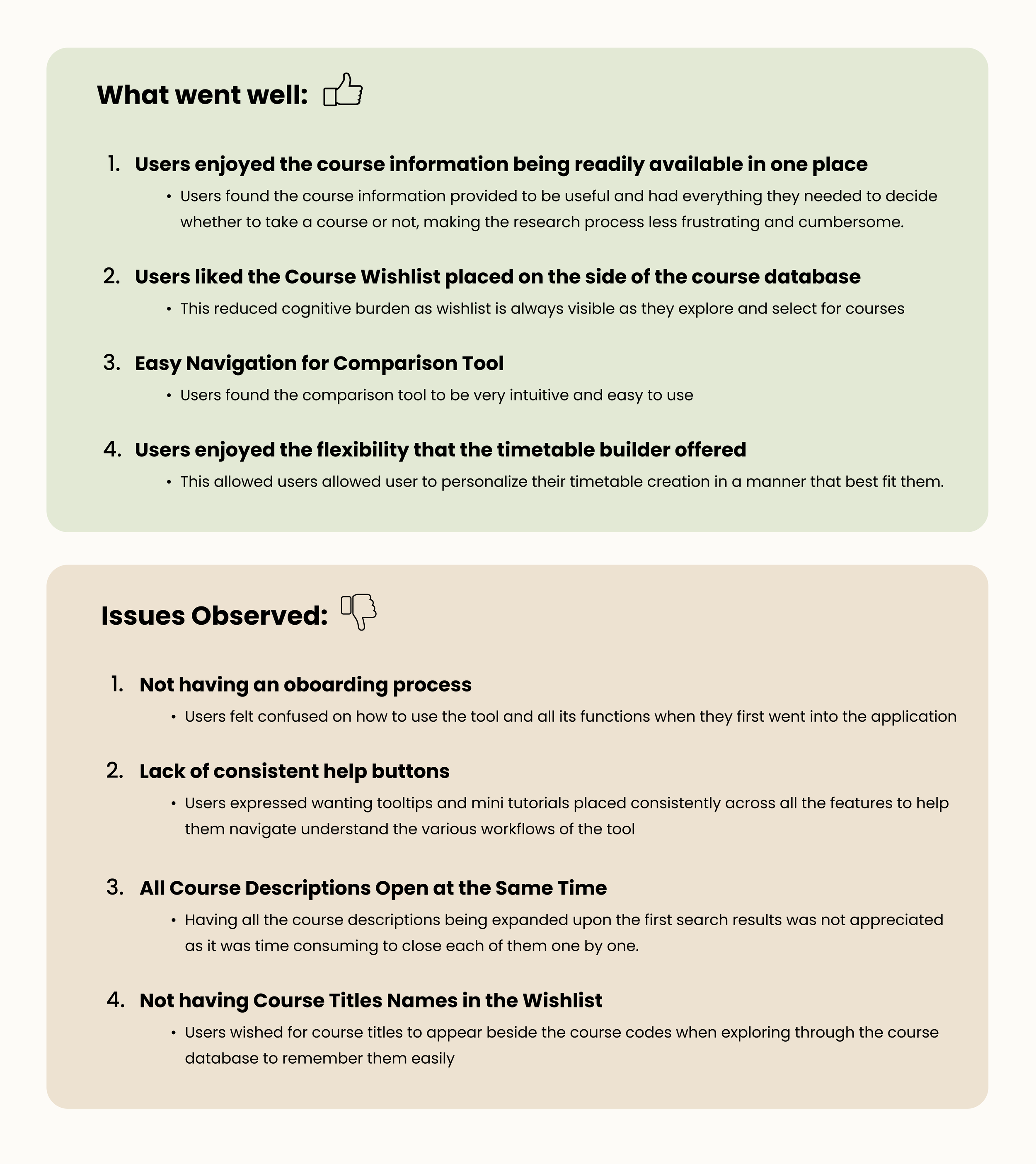
With this updated Mid-Fi prototype, we conducted another round of guerilla usability testing with 5 users to obtain feedback and areas of improvement. We found:
NEXT STEPS
1. Continue Iterating
Reduce User Doubt & Confusion
creating help buttons for quick information about the tool, considering other designs that utilize existing mental models, creating a "tutorial" to helps users make their first timetable, creating onboarding instructions to prime participants on potential ways to use the tool.
Adding More Content
adding more information to the comparison tool (e.g, course structures like assignments, quizzes, exams, etc.), and to the timetable builder (e.g., course delivery method, total number of credits in timetable already, etc).
2. General Directions
Integrate the Course Planner solution with UofT’s Enrollment Process to simplify process
Explore Faculty Staff Workflows
Faculty staff at UofT are another key user group that would be interacting closely with the Course Planner tool (e.g., updating course information, adding in new courses). Understanding how they would use the solution and their workflows to identify pain points should be considered.
More usability testing
the design process is a continuous iteration process and conducting more usability testing can help to improve the user experience when using Graduate Course Database further.

REFLECT
This project couldn't have been done alone and working in a group has allowed me to create deliverables that were greater than the sum of its parts. Although the outcomes were important, what was also equally important if not more, was the process and the valuable lessons I learned about myself along the way.
💡 1. Learning to Trust the Process
I remember initially feeling overwhelmed when I first started doing affinity mapping and seeing all the sticky notes scattered . However, as I continued to piece the sticky notes together and think of themes to group them in, it all started to made sense. From this project, I learned to embrace the uncertainty throughout the way and to simply trust the process that all will come together. I will continue applying this lesson learned towards my other projects as well.
💡 2. The Importance of Storytelling
Presenting to different industry speakers every two weeks taught me very quickly the importance of storytelling. I realized that although my findings and designs may be great, what really captures the audiences' attention and resonates with them is how I tell it. Being able to tell it in a story helps to not only bring empathy and alignment but also allows the audience to relate to the persona and their pain points. This is a skill that I want to continue honing as I progress in my career.
💡 3. Don't Be So Quick to Jump to Solutions
I learned the value in trying to first understand what the user needs beyond face value, and what they are saying. In focusing on the problem and staying within the problem space, I understood the problem from different perspectives that allowed me to build a cohesive solution. I am not the user so rather than jumping to how to build something based on what I think, taking the time to understand what the user needs is more valuable and meaningful.
Thanks for reading! :)